

Do you own a retail store or restaurant and want to manage your sales and inventory more efficiently instead of relying on paperwork and scattered spreadsheets? You will likely encounter two options: a Point of Sale (POS) system or an Enterprise Resource Planning (ERP) system.
Although both are designed to improve business management, they serve different purposes. Understanding these differences can help you invest in the right technology for your business without paying for features you may not need.
What Is a Point of Sale (POS) System?
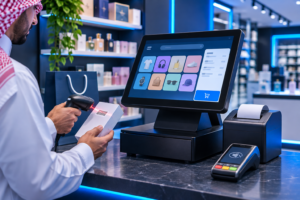
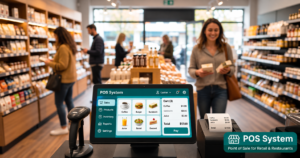
A Point of Sale system is software used by employees to process customer purchases. It records products and prices, calculates totals and discounts, generates invoices, and tracks payment methods.
When connected to compatible hardware, a POS system can also operate barcode scanners, receipt printers, and cashier touchscreen displays.
Advanced POS solutions provide sales reports, employee access permissions, and integration with inventory management and multiple branches, depending on the system’s capabilities.
This makes a Point of Sale system especially valuable for businesses that need faster customer service and accurate daily transaction records, such as retail stores, cafés, and restaurants.
What Is an ERP System?
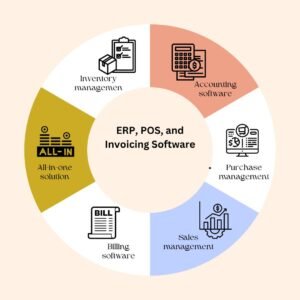
ERP stands for Enterprise Resource Planning. It is a comprehensive business management system that connects multiple departments within a single platform, including accounting, purchasing, inventory, human resources, and sales.
Instead of entering information into separate applications, employees can work with connected data that reduces duplication and helps management monitor business performance.
For example, when a purchase order is recorded, the relevant information can automatically flow between inventory and accounting departments, depending on the system configuration.
This integrated approach is particularly useful for companies managing multiple locations, warehouses, or complex business operations that require coordination across departments.
What Is the Difference Between a POS System and ERP?
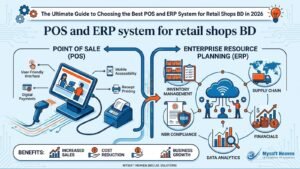
The main difference between a Point of Sale system and ERP is the scope of their functions.
A POS system primarily focuses on processing sales transactions and managing activities directly related to sales. In contrast, an ERP system covers broader operational, financial, and administrative processes.
In terms of users, cashiers typically operate POS systems, while accounting, purchasing, and management departments use different ERP modules.
Implementation costs and timelines also vary depending on the number of users, business locations, integrations, and customization requirements.
However, not every POS system is limited in functionality, and not every ERP solution is complicated. Some POS platforms include inventory, customer, and branch management, while modular ERP systems allow businesses to activate only the features they need.
When Should You Choose a Point of Sale System?
If you operate a small retail store or café and mainly need to record sales, issue invoices, track products, and manage employee shifts, a Point of Sale system may be the right starting point.
Before choosing a solution, evaluate its ease of use, compatibility with payment devices, reporting capabilities, and compliance with applicable invoicing requirements.
It is also important to choose a scalable system if you plan to open additional branches or connect your business to an e-commerce platform in the future.
When Does Your Business Need an ERP System?
If your company manages suppliers, purchasing operations, warehouses, and multiple teams, or requires integration between accounting, sales, inventory, and production, an ERP system may be more suitable.
ERP provides a broader view of business operations, helping managers make informed decisions rather than monitoring each department separately.
However, before implementing an ERP system, identify the processes you want to improve, organize your existing data, and train your employees.
Successful implementation depends on more than purchasing software. It requires proper planning and effective adoption across the organization.
Can POS and ERP Systems Work Together?
Yes. A Point of Sale system can be integrated with an ERP platform, allowing transaction, inventory, and accounting data to move between both systems according to the available integration capabilities.
In some solutions, such as certain Odoo applications, POS functions can operate as a module within a comprehensive ERP platform.
This allows businesses to maintain fast checkout operations while managing broader business activities through a centralized dashboard.
Before making a decision, ask about technical support, software updates, data backups, and user permissions. Make sure to test the system using real business scenarios rather than relying only on promotional demonstrations.
How Can Zone X Help You Choose the Right System?
Zone X provides Point of Sale solutions, retail management systems, and ERP and Odoo solutions in Saudi Arabia.
Its services include solutions for retail stores, restaurants, and inventory management, helping businesses evaluate their operational requirements and select suitable technology.
Before contacting Zone X, prepare essential information such as the number of branches, employees, current devices, business activities, and reporting requirements.
Contact Zone X to discuss your business needs and determine whether you require a standalone POS system, a comprehensive ERP platform, or an integrated solution combining both.
Conclusion
There is no single solution that works best for every business.
Choose a Point of Sale system when your priority is fast transactions, efficient checkout operations, and straightforward sales management.
Consider an ERP system when your business requires integrated management across multiple departments and more complex operations.
The right decision should be based on your current business needs and future growth plans, rather than simply choosing the software with the most features.
Contact Information
- Company: Zone X
- Phone: +966 54 116 8537
- Email: sales@zonex-pro.com
-
Website: https://zonex-pro.com/
